
Sign in and Navigation
Updated: Sep 22
Getting Started with Permalogica.
Signing In
Passwordless Sign In
Permalogica uses passwordless authentication for secure, frictionless access.
Navigate to permalogica.com
Click "Sign In" in the top right
Enter your email address
Click "Request a Link"

Check Your Email
You'll receive an email from Permalogica with your login link.
Subject: "Login link you requested"
The email contains a secure link that expires in 15 minutes.
Click the link to sign in — no password required.

Navigation
Home Screen: Projects Dashboard
After signing in, you'll land on your Projects Dashboard.
This is your command center:
All your projects listed in one place
Create new projects with one click

Pin Icon
Click to pin/unpin a project
Pinned projects appear in the sidebar for quick access
Project Menu
Workspace — Access all site assessments and files
Chat — Open the project-specific chat with Ada

The Sidebar
Open / Close Sidebar
Toggle the sidebar using the arrow icon in the top left.
Open: Full navigation and pinned projects visible
Closed: Collapsed for maximum workspace area
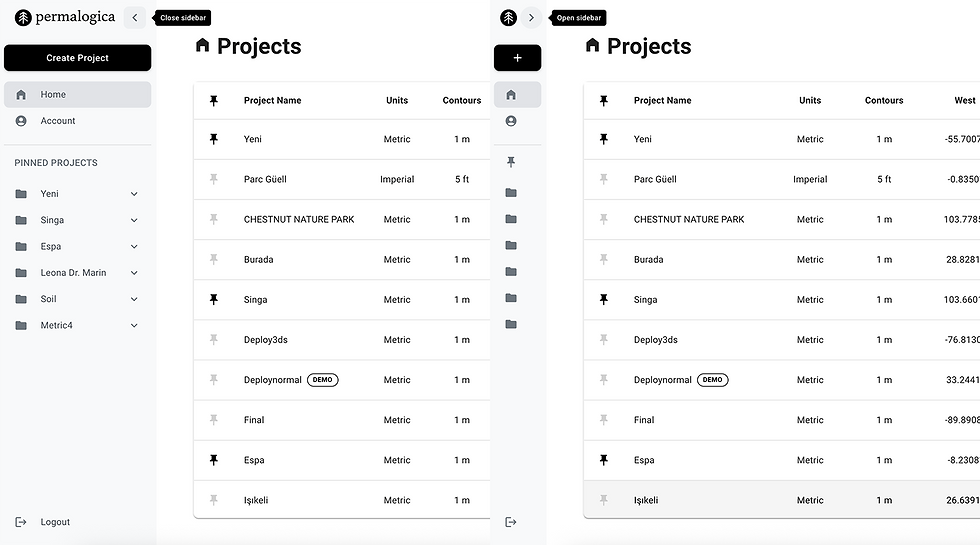
Home Tab
Quick access to your Projects Dashboard
Always one click away, no matter where you are
Account Tab
Manage your profile settings
View subscription details
Billing & Invoices

Pinned Projects
Your pinned projects appear directly in the sidebar.
For each pinned project:
Click the project name to see the breakdown.
Click "Workspace" to access all site assessments and files
Click "Chat" to open the project-specific conversation with Ada
Pin or unpin anytime using the pin icon on the dashboard

Next: Demo Project